 Glidecue
Your delivery.
Your setup.
A script editor, a rehearsal space, and a front-camera recording studio—built around the way you speak.
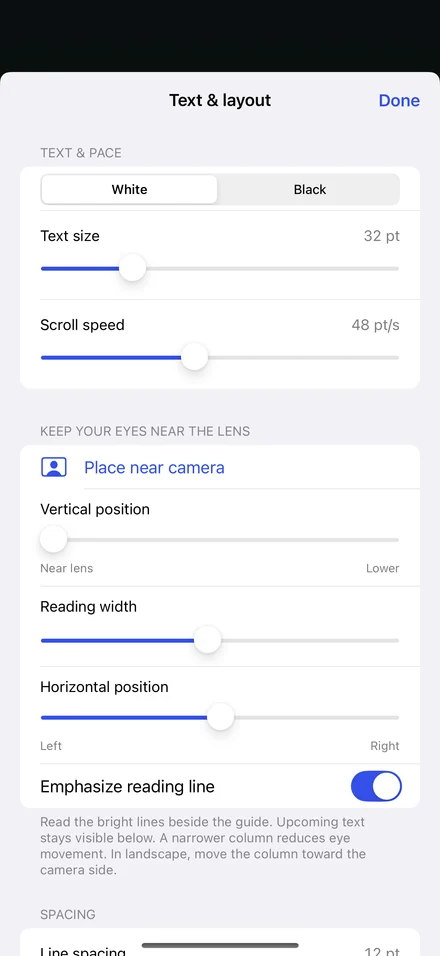
Keep the words
where you need them.
- Near-lens placement. Position the reading column vertically and horizontally, or start with Place near camera.
- Size and speed. Choose 22–64 pt text and 10–100 pt/s scrolling, with adjustable line spacing and reading width.
- Contrast that fits. Switch white or black text and adjust camera shading to keep yourself visible.
- A little guidance. Emphasize the reading line, use a guide, or mirror the script for teleprompter glass.
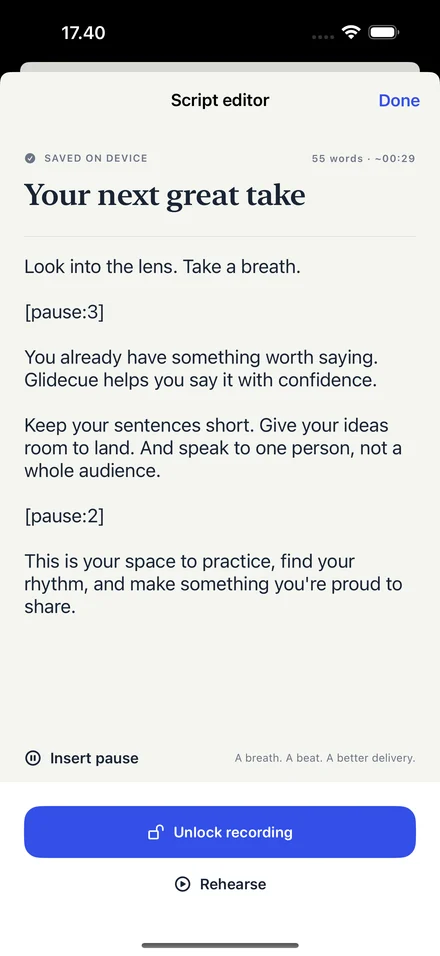
Write it.
Give it a beat.
Create a script, paste your talking points, or import a UTF-8 .txt file. Drafts save automatically on your device.
Add a pause with the editor’s Insert pause control, or type [pause:3] for a three-second hold. Search and duplicate scripts to keep working on your best ideas.
Find the pace.
Find your confidence.
Unlimited practice, with the camera off or a live front-camera preview. Use a countdown, rehearse your pauses, and adjust your framing without making a movie.
Live preview needs camera permission only. Camera-off rehearsal needs neither camera nor microphone access.
From talking points
to a finished take.
Record front-camera video and audio while the script scrolls over your preview. Extra controls hide during delivery. Pause or hold the text without stopping the camera.
Review a saved take, export through the iOS share sheet, or swipe to delete. Exports contain no script overlay or Glidecue watermark.
The useful details.
- Devices
- iPhone and iPad · iOS / iPadOS 17 or later
- Import
- UTF-8 plain text (.txt), up to 1 MB
- Pause cues
- 1–60 seconds, including decimals
- Storage
- Local to your device. No Glidecue cloud account.
- Not included
- Voice-follow scrolling, automatic captions, video trimming, or cloud sync.
Something to say?
Make it yours.
Unlimited rehearsal. One purchase to record.
A little more confidence in front of the camera.